
We loved Linear. Before Macro we ran our old company on it, and Macro Tasks is inspired by its keyboard-first speed and design principles.
Linear is really really good for pure task tracking.
But tasks don't exist in a vacuum...
The actual conversation about the task is in Slack, and you work on the code in Claude, and the docs are in Notion. Customer emails with bug reports are in Gmail/Superhuman. All of these apps are disconnected from each other.
Architecturally, task management should not be a separate tab from the rest of the work — they should be part of the same system. Macro is that system: tasks in the same @linked workspace as email, messages, agents, docs, calls and CRM.
The problem with standalone issue tracking is as Linear says themselves...
Issue tracking is dead.
It was built for a handoff model of software development. A PM scoped the work, engineers picked it up later, and the system filled with prioritization, negotiation, and workflows to bridge the gap [...] But over time, complexity started to look like sophistication.
Indeed, standalone issue tracking is dead. It was already cumbersome to create and manage issues. Agents were the death knell.
What we took from years of running on Linear, and why we eventually wanted tasks to live next to everything.
At a glance
| Macro | Linear | |
|---|---|---|
| What you get | Tasks inside a full workspace | A focused issue tracker |
| Fast, keyboard-first tasks | Yes (Linear-inspired) | Yes (the benchmark) |
| Create tasks from email | Yes, native | No |
| Create tasks from chat | Yes, bidirectional | Via integration |
| Create tasks from calls | Yes (recorded, transcribed) | No |
| Links | Bidirectional with everything | Other issues and connected apps |
| GitHub linking | Yes, bidirectional | Yes, deep |
| PRs in a unified inbox | Yes | No |
| Chat, email, docs and CRM | Yes, native | No |
| Shared AI memory across team | Yes | No |
| Cycles, projects and roadmaps | Lightweight | Deep |
| Triage, insights and workflows | Basic | Advanced |
| Third-party integrations | Growing | Extensive |
| Open source | Yes, end to end | No |
| Pricing | Flat, by stage | Per seat, by tier |
Task creation: Linear is manual, Macro is automatic
Macro and Linear are comparably fast once you are inside the tracker: tasks are quick to create, assign, prioritize and close with keyboard shortcuts.
But most tasks are ideated somewhere else — an email from a customer, a line in a spec, a comment on a call — and when we used Linear that meant switching tabs to hit c/t. Sounds fast, but since it's another thing to do, the Slack conversation, eng huddle, or customer email often never led to a ticket.
In Macro you spin one up without leaving where you are working. Every task is linked back to its source bidirectionally — the task remembers where it came from and the source knows the task exists. Linear can be notified about a Slack thread; in Macro the message and the task are two views of one object.
From a customer email
Open any email — a customer report, a bug thread, a partner ask — and hit Task in the Actions panel. Macro opens the create-task modal with the email already attached as context, so the assignee can jump straight back to the thread.
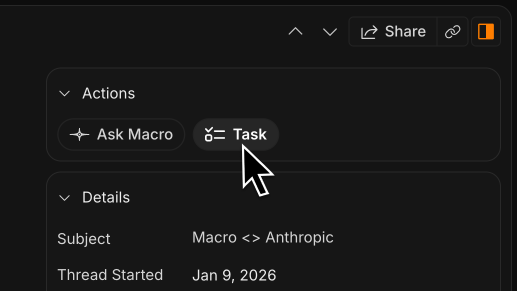
Hit Task on any email to turn it into a tracked item without leaving your inbox.
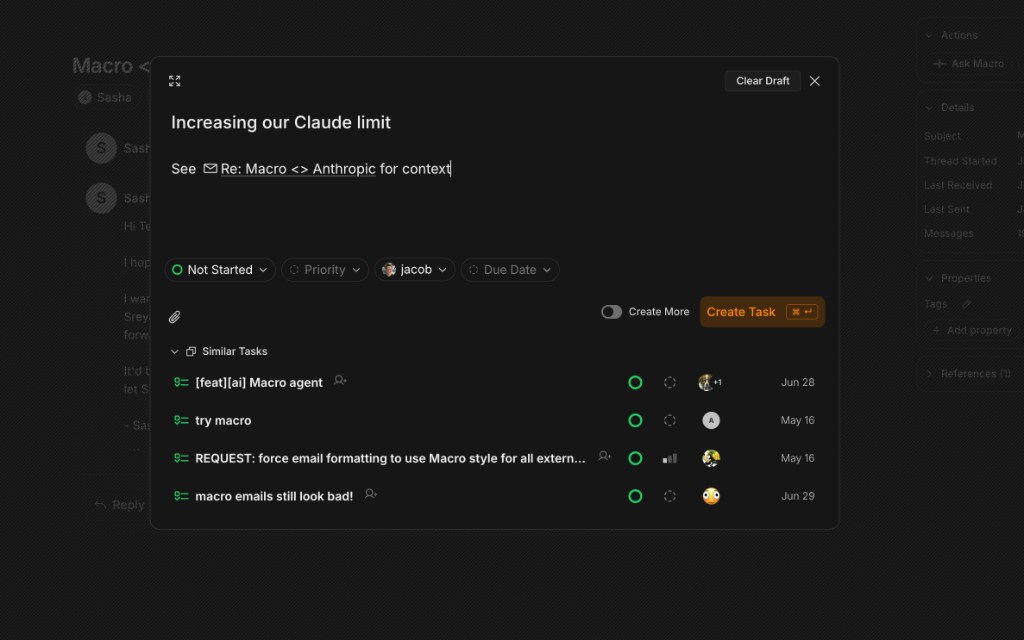
The modal opens with the email linked — status, assignee and priority ready to set, source attached.
From a channel message
Hover any message and click Create task. Macro spins one up deterministically, linked to that thread — no copy-paste into another tab.
Click Create task on any message to spin one up, linked to that thread.
Ask @Macro
Mention @Macro in a channel and ask it to create a task from what was just said. It assigns the work and links the task back to the conversation.
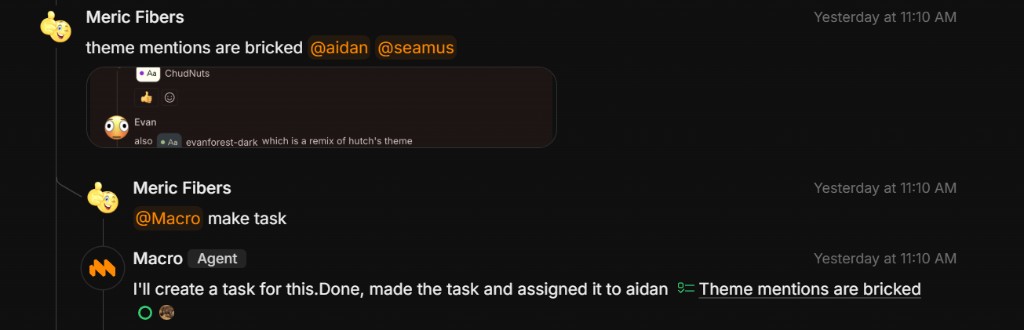
Mention @Macro in a channel and it creates a task from the conversation, linked back to the thread.
Keyboard shortcut
Hit c then t from anywhere to bring up the create task modal — the same Linear-style speed, without leaving Macro.
From markdown to-dos
Drop a to-do box into any markdown area, highlight the set, and turn them into tasks at once. Specs and notes become tracked work without a separate triage pass. Linear can do something similar, but only inside a task — as subtasks. In Macro it works anywhere in the workspace: a personal "todos July 9th" doc, a meeting note, a spec, not just the task editor.
Tasks are quick to create and easy to close out — status, priority and assignee, linked to the rest of your workspace.
Create and assign tasks from standups and huddles
A lot of tasks are decided on a call and never make it into a tracker — someone says they will do something on the standup, everyone nods, and by Monday nobody wrote it down. With Linear that meant opening another tab after the huddle and trying to remember who owned what. Macro keeps the meeting in the same workspace as the tracker.
Spin up a huddle in any channel or DM without sharing a link, or run a full meet with one. Calls record, transcribe and diarize by default, so what got said on the standup is searchable and shared with the team. Mention @Macro during or after the call and ask it to create tasks from what was discussed — Macro assigns them to the right people and links each one back to the recording. No one has to play secretary.
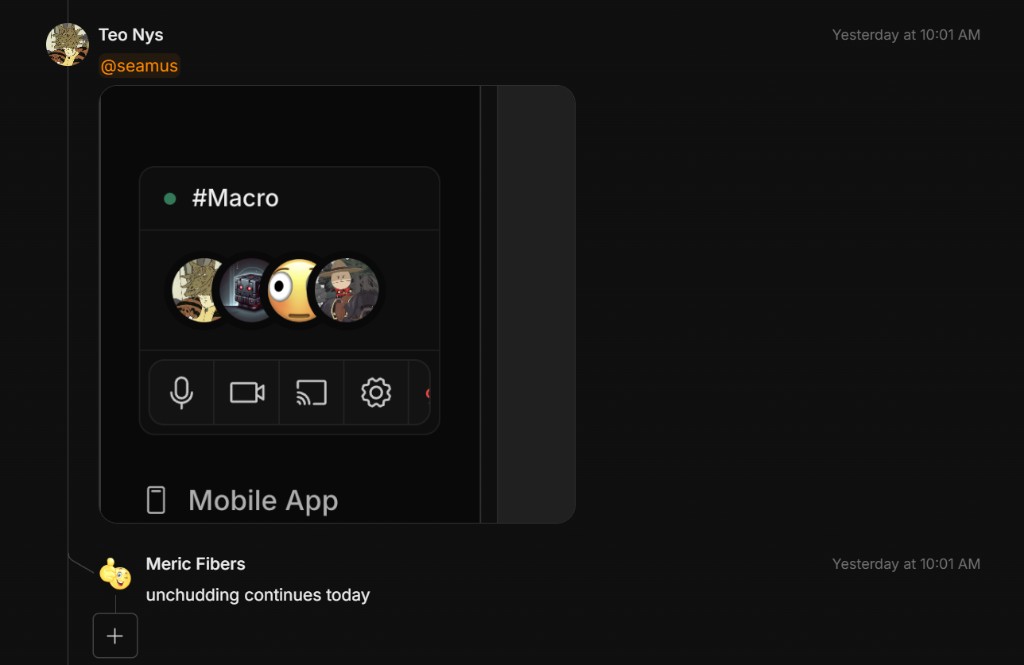
Start a huddle from any channel — on desktop or mobile — and turn what gets said into assigned tasks when it ends.
Linked to GitHub, both ways
For engineering work, Macro tasks link to GitHub bidirectionally and to the agents working on them. Click the GitHub pill to jump from a task to its pull request, or the other way around, all opening in a split inside Macro so you never leave your workspace.
Here's what this looks like on mobile:
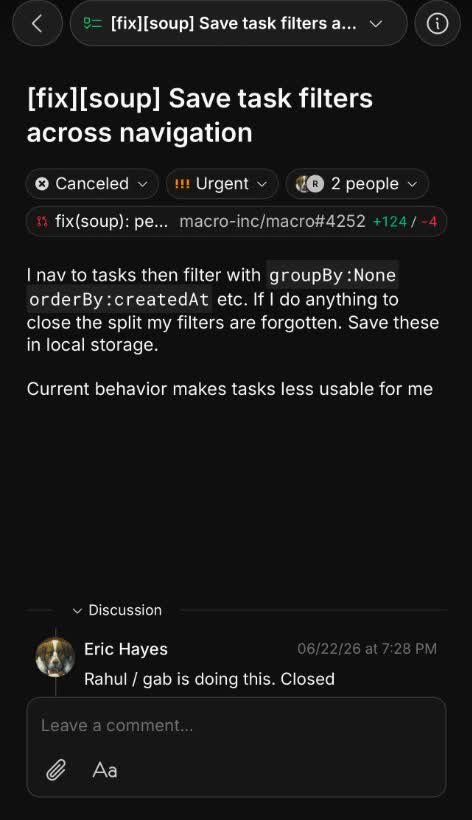
A task with its GitHub PR linked bidirectionally — click the pill to open the review in a split.
The integration goes one step further into your inbox. GitHub's own notifications are famously easy to miss, so Macro brings the PRs where you are the author, are mentioned, or get a comment into your unified inbox alongside your messages, tasks and important email. You stop checking three places to find out a review came in, and team velocity goes up for the boring reason that nothing waits unseen.
Linear recently added the ability to view PRs alongside issues, albeit not unified in an inbox with messages and mail in one place, it is still a separate thing to check.
One linked system, one team memory
In Linear you link issues to issues, and to PRs and a handful of connected apps. In Macro you can @-mention anything in your company from a task: a doc, a file, a customer email, a support ticket, a channel message, a recorded call. The links are bidirectional, so the task and whatever it touches both know about each other, and your workspace becomes context you can navigate in either direction.
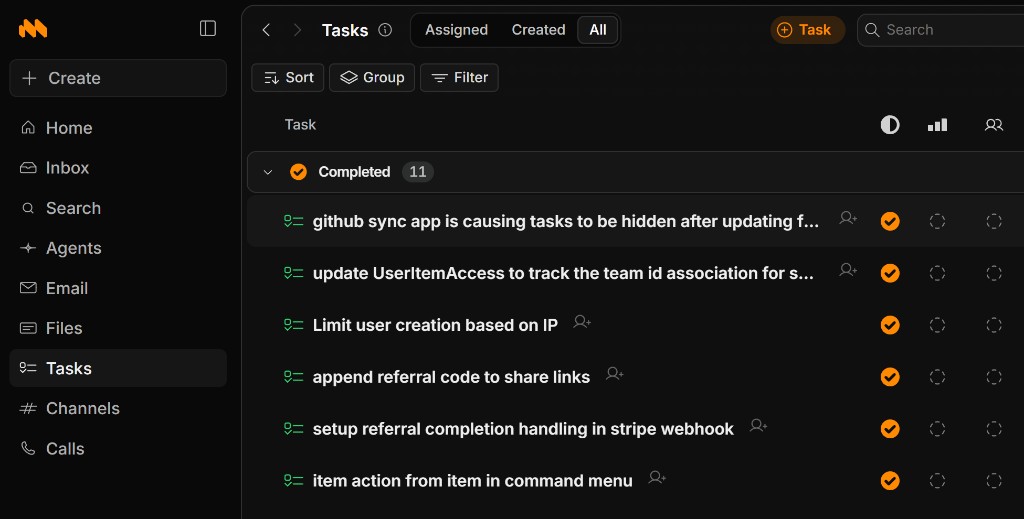
Tasks live in the same app as email, channels, calls and everything else — one rail, one linked system.
That web is also how permissions work. Anything you @-mention in a channel is shared with the people in it; join a channel and you gain its context, leave and you lose it. There is no access-request dance, because membership is the permission.
The same linked graph feeds shared memory across your whole team. Macro builds it from your docs, email, tasks, channels, calls and CRM, refreshes it nightly, and lets agents do work a standalone tracker cannot: assign a task to whoever actually owns that area, route an incoming customer report to the right person, or tell you who to ask about a piece of code. No tool that only sees issues has the right to reason across all of your work. A unified workspace does.
What our users say
We dogfood Macro internally. After years on Linear, here is what the team said about switching:
“I think because they’re faster to make I make more of them and track more of them. And that part is positive. I make more tickets compared to Linear and I lose track of less stuff — I’m already there checking the messages and I can easily turn that into a task instead of having to open Linear.”
“Compared to Linear, Macro has an obvious good writing surface. I do more spec writing in tasks for agents — in Linear I didn’t like the writing surface as much — then I’ll use a skill to delegate it to an agent.”
“I’ll often collect tasks into a todo doc, which is easier in Macro. I prefer organizing things in a markdown doc vs the list view — it’s just easier for me.”
“I joined at the tail end of when we used Linear. I think I make tasks less in Macro — because in Linear I used to make a lot of tickets each morning as a morning ritual. Now the tickets are mostly there for me.”
“In Linear it felt like there was a big giant backlog of tasks; I probably should have gone in and deleted them. In Macro I still have a backlog obviously, but it’s less cluttered.”
FAQ
Should I switch from Linear to Macro?
If your stack is Linear plus Slack plus email plus docs plus a CRM, yes — that is five tools that do not share context. Run Macro alongside Linear for a week, create tasks from your real email and channels, wire up GitHub, and see how much context-switching disappears.
When would I keep Linear instead?
When you explicitly want standalone issue tracking disconnected from email, chat, calls and docs — a dedicated tracker tab and integrations to bridge the gap, rather than one linked workspace.
Is Macro open source?
Yes, end to end: github.com/macro-inc/macro. Your data stays open and portable and the app is extensible. Linear is closed source.
Can I move my Linear issues over?
Run Macro alongside Linear while you switch — create tasks from live email and channels so new work lands in Macro without a big-bang migration, then bring the rest across as you go.
For shortcuts, @mentions, the task component and GitHub integration, see the Macro tasks documentation.