
Before Macro, we used Slack for years and never had any problems with it.
That's to say, beyond the usual, mildly annoying problems that I didn't think of as being that bad:
- Slack is "noisy", seemingly encouraging random pings and constant babysitting. It was unclear to me whether this was an issue with Slack or just with workplace chat in general. We used to have quiet hours for focused deep work where no pings were allowed. Certain people muted certain channels (and DMs 🙍), which was a good stopgap until it led to the cultural issue of people not seeing messages.
- Slack, being owned by Salesforce, isn't really integrated with your tools. We never used Microsoft Teams, but I'd guess Teams is more tightly integrated with the Office suite than Slack is with Google. But then you'd have to use the Microsoft suite, and no team that has the choice wants to do that. What I mean is: Slack isn't tightly integrated with Gmail or Google Docs, or with tools we used like Notion, Linear and Figma. The result is that conversations get split between Slack and the commenting features of those tools. Again, I didn't realize this at the time, but it's a big reason why things got chaotic as we scaled our team.
Since migrating onto Macro I've realized Slack was taking up more time than I thought it was, for me and our team. It was kind of like a mini social network.
Not quite as distracting as Twitter, but still pretty distracting for our team.
I'd seen people complaining about Slack being noisy before, but I didn't really grok it until we switched off it onto Macro Chat.
What Slack got right about team chat, and where a chat-only app leaves real work on the table.
At a glance
| Macro | Slack | |
|---|---|---|
| What you get | Channels inside a full workspace | A best-in-class standalone chat app |
| Inbox | A real inbox; leave messages for later | Read and unread only |
| Focus | Signal and Noise, AI-sorted | Notifications and mute |
| Connected to | Email, docs, tasks, calls, CRM | Outside apps via integrations |
| @-mentions | Anything in your company | People and channels |
| Fast team channels | Yes | Yes (the benchmark) |
| Create tasks from messages | Yes, native and linked | Via integration |
| Native email client | Yes | No |
| Docs and editor | Yes (CRDT, agentic) | Canvas (basic) |
| CRM | Yes (auto-updating) | No |
| Calls | In-channel, recorded, transcribed | Huddles (no memory) |
| App directory and integrations | Growing | Extensive |
| Cross-company channels | Limited | Yes (Slack Connect) |
| Shared team memory | Yes, across every surface | No |
| Open source | Yes, end to end | No, closed box |
| Pricing model | Flat, by company stage | Per seat, by plan tier |
A Signal vs. Noise split to keep you sane
The main innovation of Macro for making things quieter is the Signal vs. Noise split. Important emails, messages and @mentions go into Signal, and non-important things go into Noise.
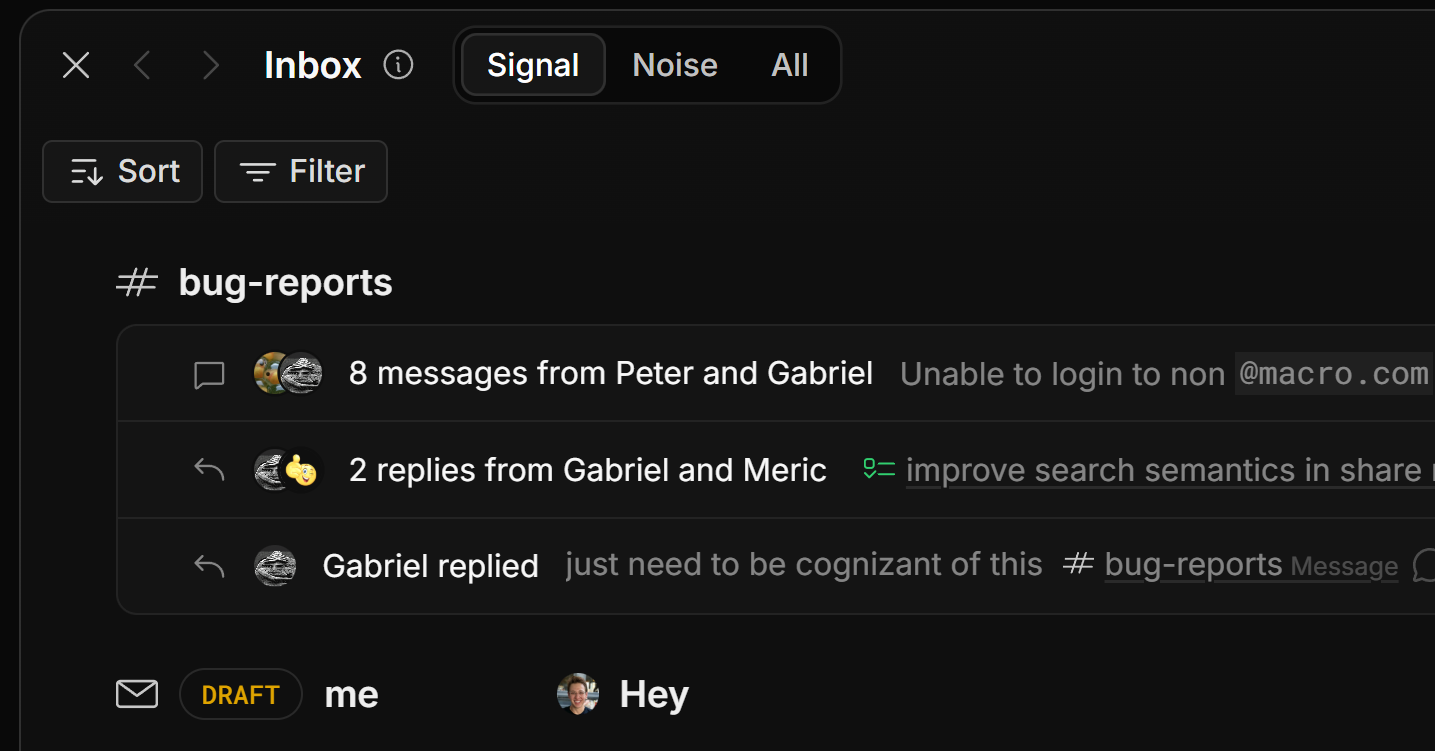
One inbox, pre-sorted: what matters lands in Signal; everything else waits in Noise until you want it.
Unread on the side, not everything
The second big thing that makes Macro less noisy than Slack is that only your unread channels are on the side, not every channel (of course, you can pin channels if you want them there). This ever-so-slight bit of friction to open a channel, for everyone on your team, creates less traffic. I know it doesn't sound like much, but when I introspect on why our Macro Chat is quieter than our Slack was, I think this is why.
Macro Chat tightly integrates with engineering tasks
If you read our post on Macro vs. Linear, you'll see me talk about how tightly channels are integrated with Macro tasks. This has been really helpful for our engineering team staying on track without needing a dedicated PM keeping track of everything — which works well with our culture of agency and no micromanaging. We no longer have to "stay on top" of everybody, because everybody is creating tasks and marking them complete (or it happens automatically with the GitHub integration) without me having to prod them to keep things updated.
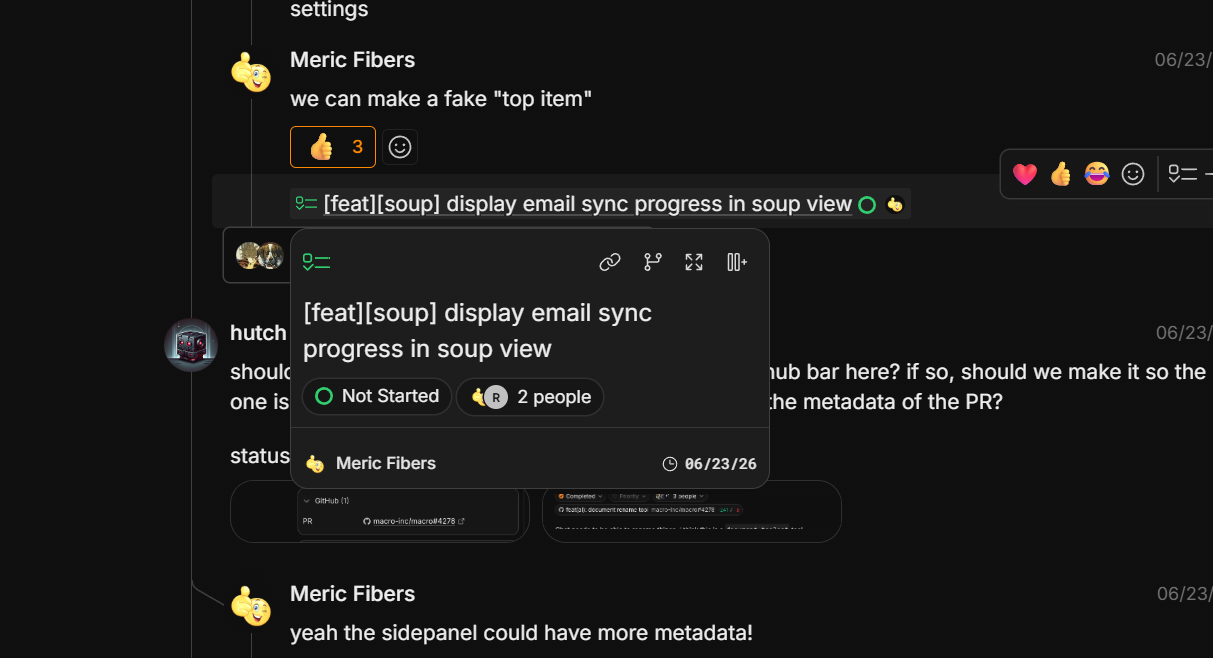
Tasks render as live pills right in the conversation — hover to see status, assignees and the linked GitHub PR.
Split-screen channels in Macro Chat
Slack only lets you have one window open at a time, which makes it hard to multitask. When I look at our team using Macro Chat, they often have multiple splits open at a time, which wouldn't be possible with Slack. This makes it easy to carry out multiple conversations in parallel.
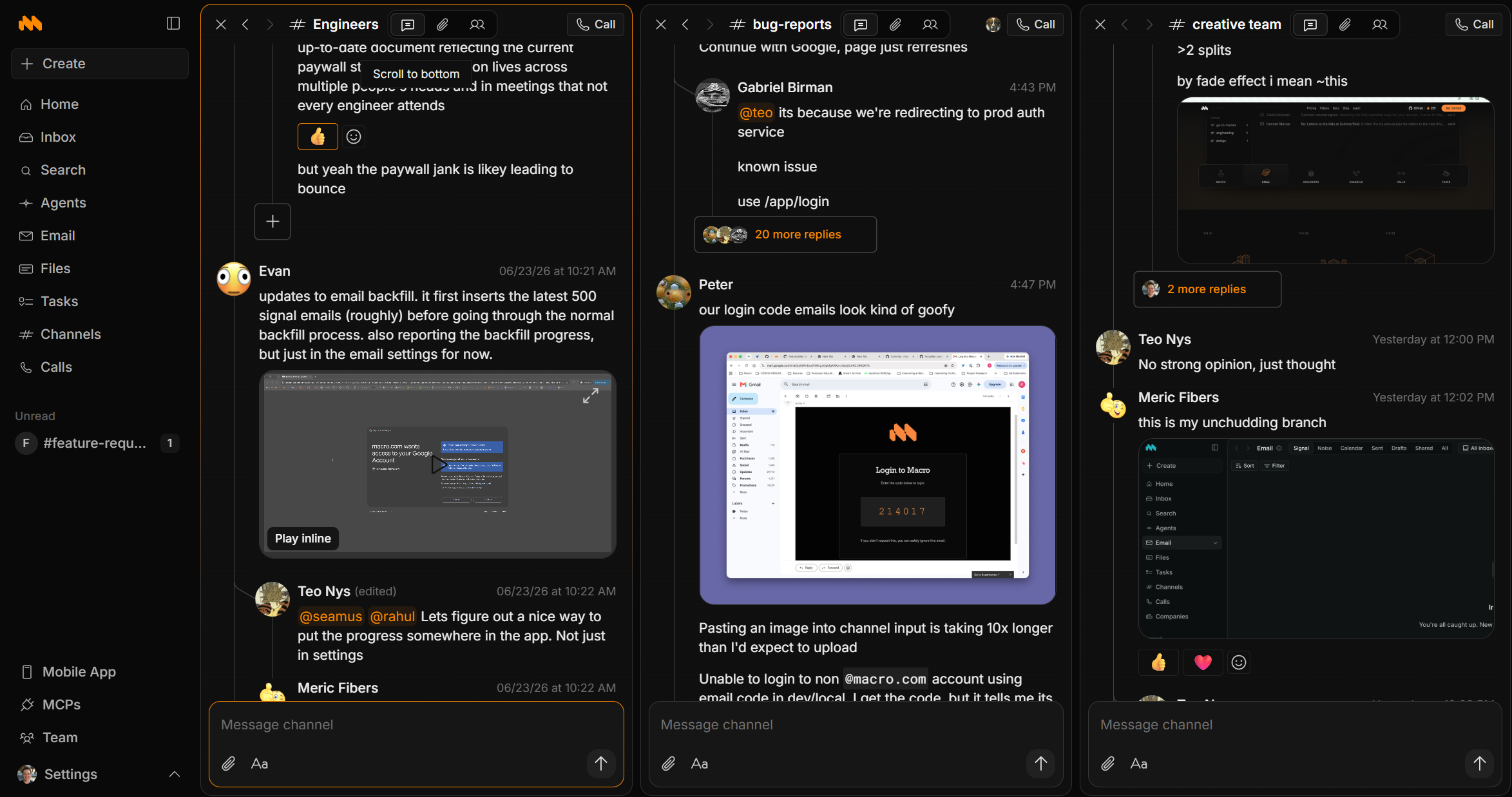
Three channels open at once: triage a bug, follow the engineering thread and answer the design question in parallel.
Inline replies are easier to read in Macro
With Slack, I'd often forget which channel a message was sent in, and I'd have to go looking through all the different channels to find it.
In Macro this is a lot easier because the first few replies to a message show inline (like Reddit or forums), instead of being hidden in a side flap like Slack that you need to expand to see the context of the thread. Most threads are just people saying "okay" or one or two more messages, and it's wasteful to have to stop and open the thread just to see one additional message. Really long threads are still perma-linked, and you can hit expand to view them fully.
For example, here's how I can read multiple threads at a time without needing to expand and collapse:
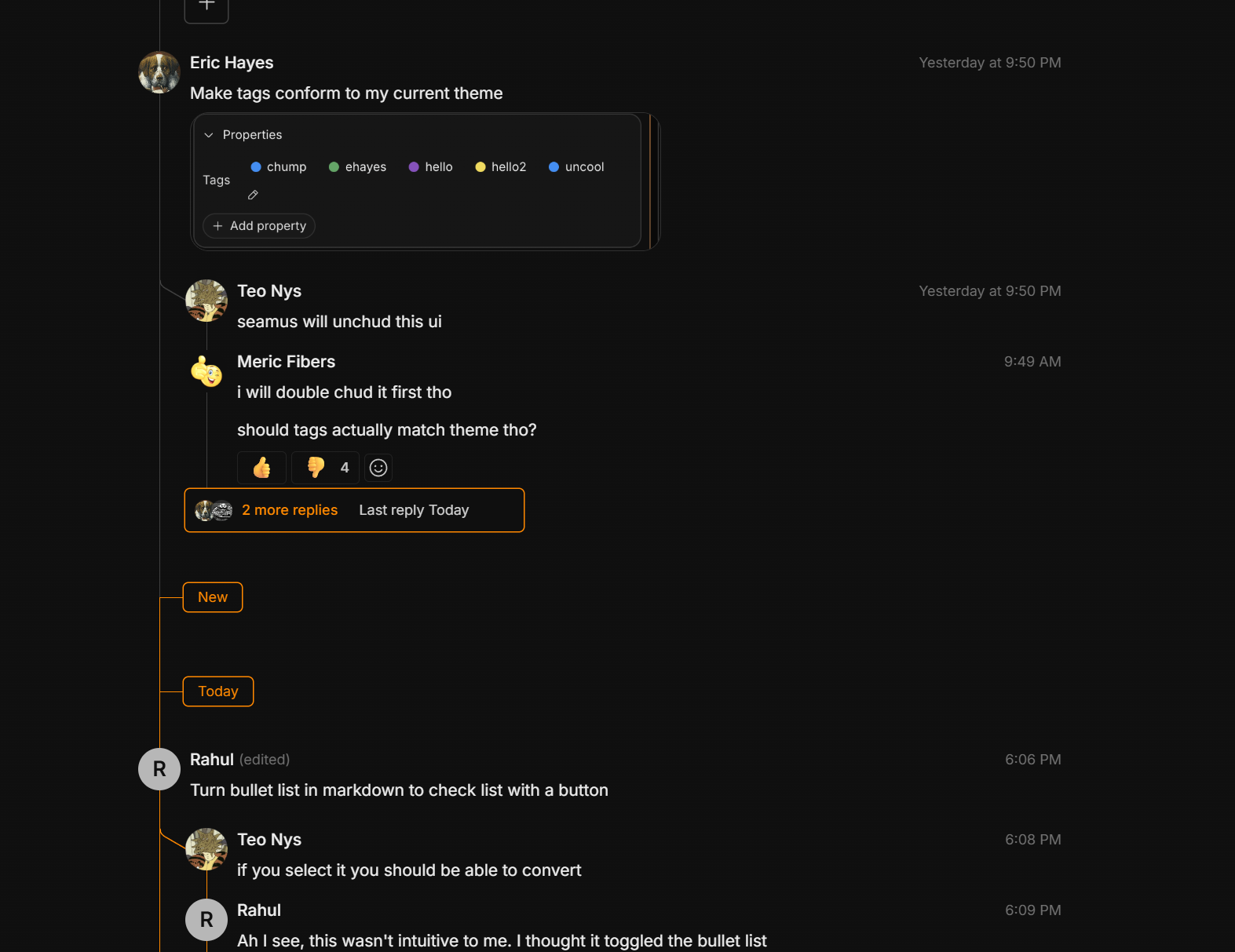
Short threads read top to bottom, in place — no side flap, no clicking into each one.
Replying to a thread works like this. Just click the + button and the thread expands:

Better access for agents: a real MCP surface
One of the awesome things about Macro is the unified memory for the agent. It can search all your channels as well as list recent messages in bulk. That's the important part: in bulk. Where Slack's MCP is limited in what it can read, Macro's MCP is far more capable for the agent — and for your own agents that you can plug in. Here's an example of that:
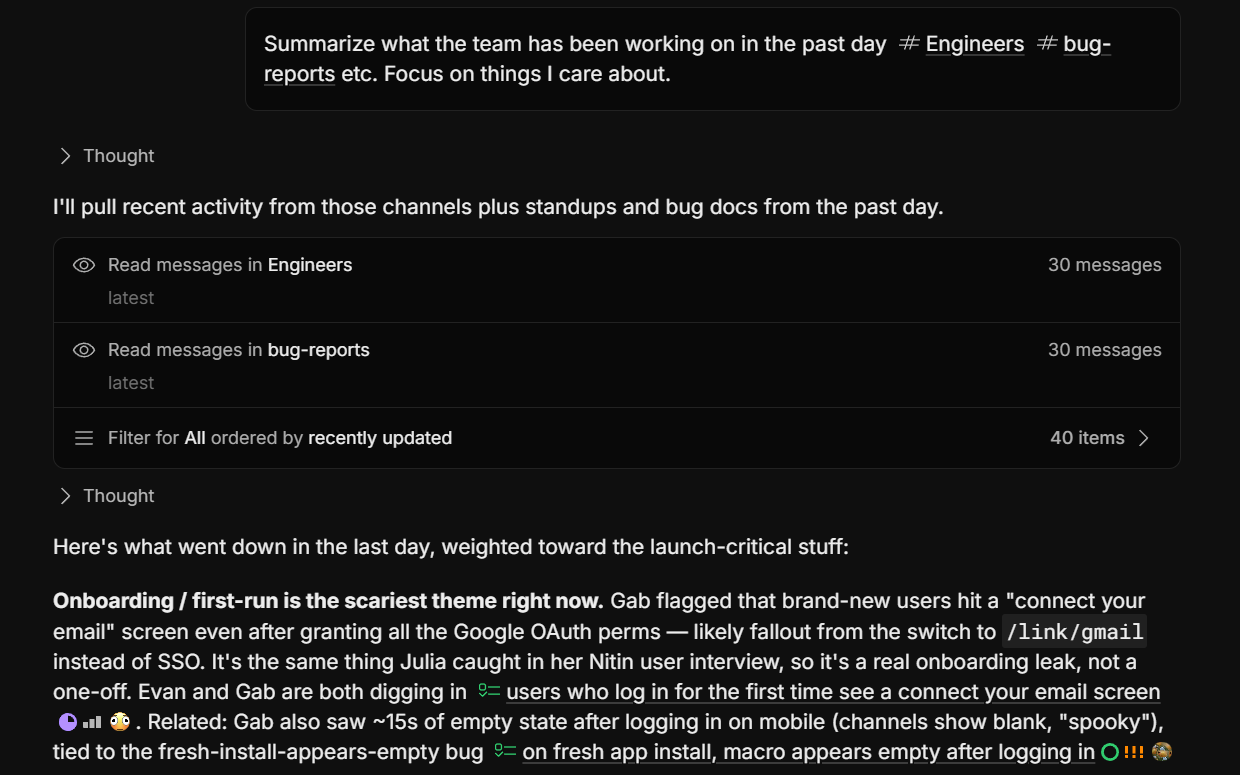
One prompt, whole channels read in bulk — the agent summarizes a day of team activity across channels, tasks and docs.
You can also feed the agent context manually by @mentioning, like this:
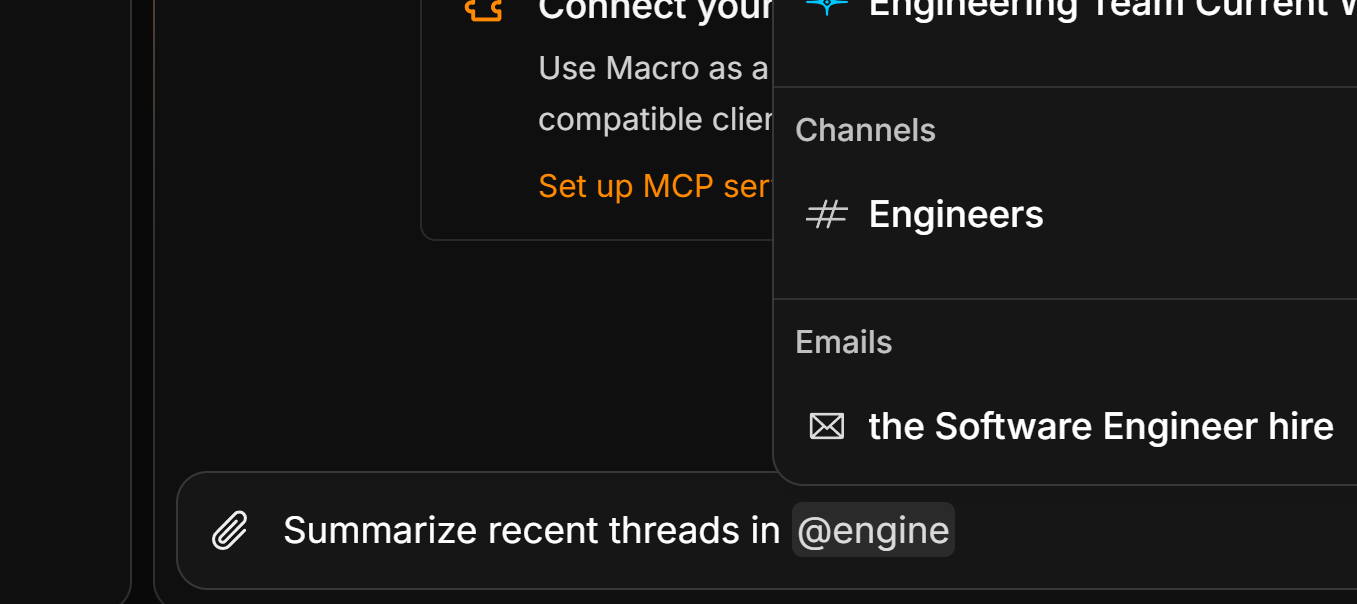
Powerful built-in agents, integrated with your workspace
Slack and Macro both have agents in channels, @mentionable just like human users. Slack has a well-developed marketplace and a lead in integrations compared to Macro (as of 2026), whereas Macro has a stronger first-party agent with full-workspace context and the ability to take action. When you @Macro in a channel, it gains the permissions of the person sending the message, allowing it to access everything, create tasks, send messages, and more.
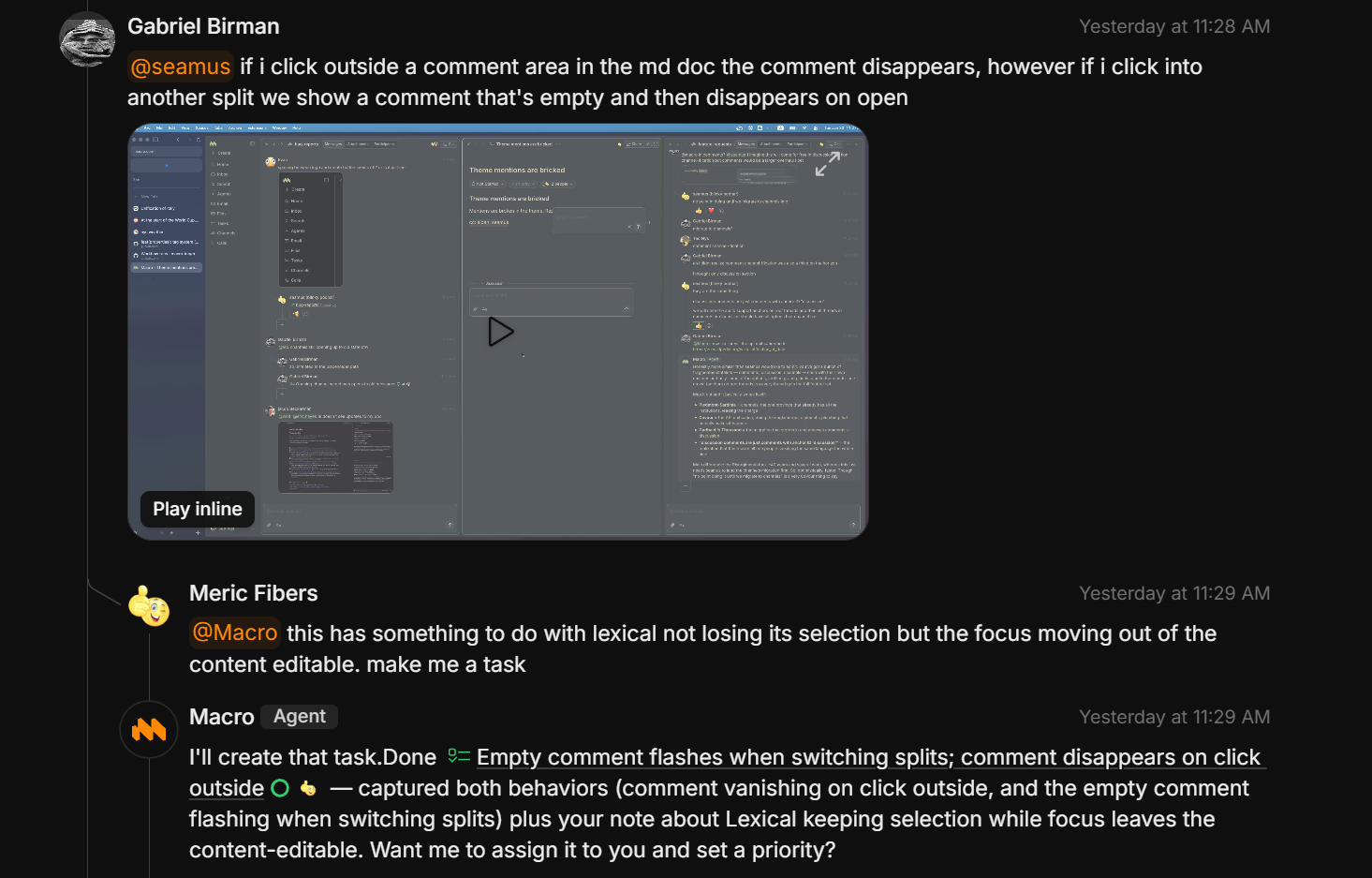
@Macro reads the thread, creates the task and links it back — then asks if it should assign and prioritize it.
Conclusion
Slack is a mature chat platform with a big integration marketplace and Slack Connect to chat across companies. Macro is quieter, has better UX, and is a more powerful bedrock for agentic development.
FAQ
Should I switch from Slack to Macro?
If your stack is Slack plus email plus a tracker plus docs plus a CRM, yes — that is five tools that do not share context. Run Macro alongside Slack for a week, move a few active channels over, and feel what a real inbox and a Signal/Noise split do to your day.
When would I keep Slack instead?
When you depend on Slack's enormous app directory or on Slack Connect channels with external companies. Those ecosystems took years to build and we will not pretend Macro matches them yet; some teams keep both during a transition.
Does Macro have huddles or calls?
Yes — start a call in any channel or DM like a huddle, or share a link like Google Meet. Calls run across devices with nothing to install and are recorded, transcribed and diarized into your team's shared memory by default.
Is Macro open source?
Yes, end to end: github.com/macro-inc/macro. Your data stays open and portable and the app is extensible. Slack is closed source.
For the inbox, Signal and Noise, @mentions and turning messages into tasks, see the Macro channels documentation.